
I’ve spent most of my recent career on Teams voice. Direct Routing, SBCs, auto attendants, call queues and plenty of migrations. Lately I’ve been doing more and more on the Microsoft AI side, mostly Copilot Studio, and Teams Phone Agent is the first product that properly sits across both.
So I built one. I wanted something closer to a real deployment than a hello-world, so it’s a full phone line for a fictional council called Kestrel Vale, with resident records and cases in Dataverse, transfers to real call queues, and a softphone registered to my SBC so I can ring it as different residents.
What it does#
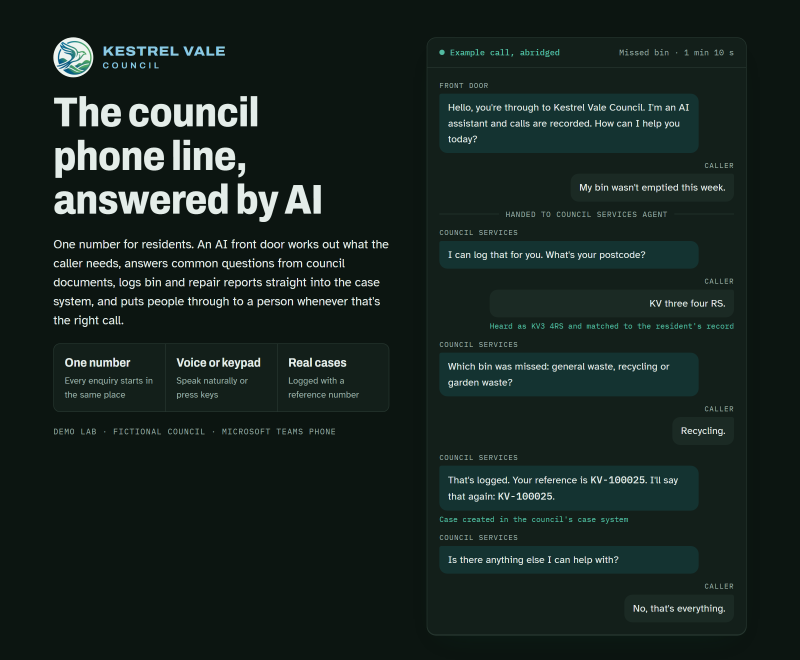
A resident rings the council number. The call comes in over Direct Routing and Teams Phone Agent answers it, gives the AI disclosure and asks how it can help. From there it can:
- answer council tax and general questions from the council’s own documents
- hand the call to a Copilot Studio voice agent to report a missed bin, report a housing repair or emergency repair, or check on an existing case, all of which create or read real cases in Dataverse
- put the caller through to Customer Services, Housing Repairs or the Adult Social Care duty desk
- screen out known nuisance callers, record the call to SharePoint and stop the call politely if it runs too long
None of it is staged. Every step in this series is something I’ve had working on a real call, and anything I haven’t got working yet is marked as such.
Why a series#
The Microsoft docs tell you which settings exist. They don’t tell you that the menu greeting never gets played, that saving in the admin centre quietly wiped settings I’d made in PowerShell during the preview, or that the caller’s number doesn’t reach your Copilot Studio agent. I found those out the slow way, and most of what’s useful here is in the gaps between the docs and what happens on a call.
Each post covers one part of the build, what went wrong, and what I’d do differently on a customer project.
The series#
- Teams Phone Agent, auto attendants and Copilot Studio: which does what
- Foundations: resource accounts, Direct Routing and voices
- Q&A tools: getting your content in
- Building the Teams Phone Agent in the admin centre
- Spam, recording and call length templates (coming soon)
- Copilot Studio voice, part 1: data and identifying the caller (coming soon)
- Copilot Studio voice, part 2: topic patterns for the phone (coming soon)
- Handing calls back to people (coming soon)
- Bookings and chaining one Teams Phone Agent to another (coming soon)
- Testing like a caller: a SIP softphone on your SBC (coming soon)
- What I’d tell a customer (coming soon)
There will also be a standalone gotchas post for anyone who just wants the list.
Before you start#
I built Kestrel Vale while Teams Phone Agent was in Microsoft’s Frontier public preview. It went generally available on 30 September 2026, so you no longer need to be in Frontier to use it. A few settings that were PowerShell only in preview are now in the admin centre, and I’ve called that out wherever it changes a step. Anything I haven’t re-tested since GA is marked.
Kestrel Vale is made up, and so is its crest, which is AI-generated. The residents, addresses, phone numbers and case references are all test data, and I’ve left tenant IDs and SBC details out.
I’ll put the topic YAML and PowerShell scripts on GitHub as the series goes on, and link them from each post.
If you’re building one and have hit something I haven’t, I’d like to hear about it.