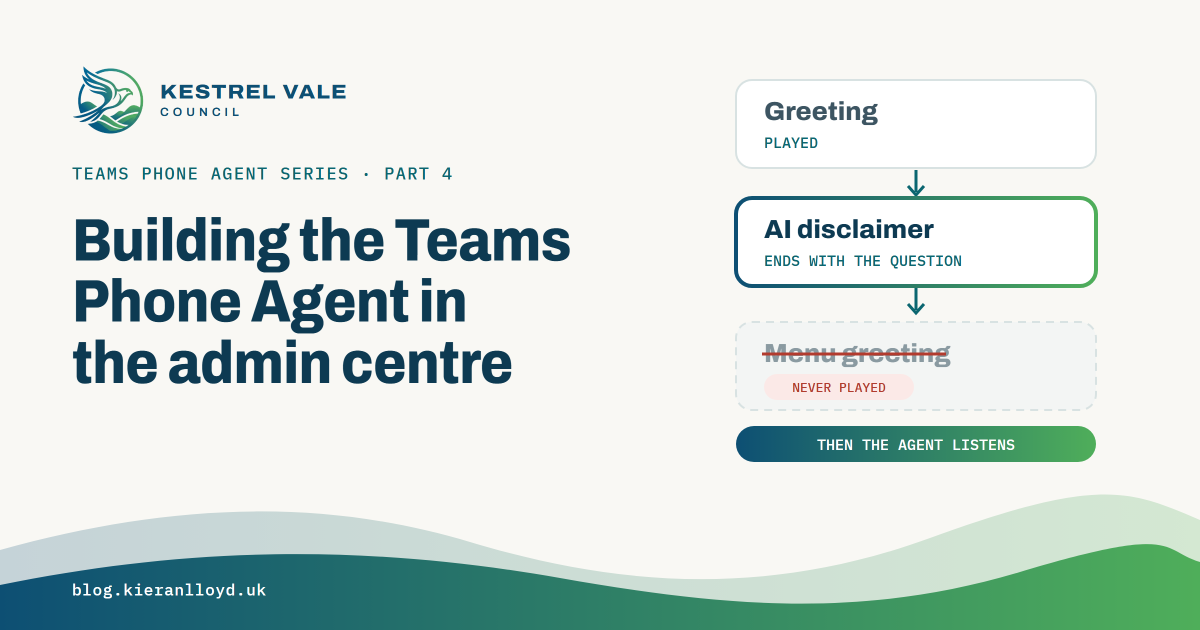

This is the main build, the wizard that turns a resource account into the Kestrel Vale phone line. Most of it is a normal auto attendant. The parts that matter are the menu, which works differently from the one you’re used to, and one text box that the wizard insists on and never plays. Get either wrong and the first thing a caller hears after the greeting is silence.
If you want the background on what a Teams Phone Agent is and how it splits from Copilot Studio, that’s in post 1. The resource account it needs is in post 2.
Getting to the wizard#
In preview it was Voice > Auto attendants > Add, then the advanced setup, where a Teams Phone Agent toggle had to be switched on. It showed a notice first, then Enable. Quick setup couldn’t create one.
At GA, per Microsoft’s setup page, it’s Voice > Auto attendants > Add > Teams Phone Agent. The switch is on by default, and turning it off drops you back to a standard auto attendant. I built mine in preview, so I haven’t clicked through the GA route myself.
Step 1, general info#
| Setting | Kestrel Vale value |
|---|---|
| Name | Kestrel Vale Council - Main |
| How callers reach it | Through a resource account, the Teams Phone Agent type |
| Language | English (United Kingdom) |
| Voice | Ava at first, now Andrew |
| Operator | Voice app: KVC Customer Services, a call queue |
“Through a voice app” isn’t available for a Teams Phone Agent, so the resource account is the only way in. The language setting controls the disclaimer and the fallback language, not the accent. Post 2 covers the voices.
Step 2, hours#
Time zone London, Monday to Friday 08:30 to 17:00, weekends closed.
Step 3, the business hours call flow#
The greeting is “Thank you for calling Kestrel Vale Council.” The AI disclaimer is customised, and after a couple of rounds it ended up as “I’m the council’s virtual assistant. You can ask for a person at any time. How can I help you today?” Microsoft’s caution is that if you turn the disclaimer off, you’re responsible for telling callers they’re talking to an AI.
For call routing I chose Play menu options. The maximum call length is 10 minutes. The default is 4, which is too short for a housing repair report followed by a transfer. Post 5 covers the message callers hear when the limit hits.
Force listen isn’t supported with a Teams Phone Agent, and neither are audio file greetings or announcements. Everything is text read out by the voice.
The menu greeting that never plays#
A Teams Phone Agent call flow has three text boxes. Greeting, AI disclaimer, and Menu greeting message. The wizard won’t let you continue without a menu greeting of at least 10 characters, because the menu setup is shared with classic auto attendants. On my calls it was never played.
What the caller heard was the greeting, then the disclaimer, then silence while the agent waited for them to speak. My first disclaimer didn’t end in a question, so callers got dead air and no clue they were supposed to say something. Microsoft’s own default disclaimer is “I’m a virtual assistant. How can I help you today?”, which I think is a hint.
The fix is to end the disclaimer with the question. Do it in the after-hours flow too, and in any holiday flows you add, because each has its own disclaimer field.
Don’t list the menu options in any of these boxes. The agent routes from what the caller says. Microsoft could start playing the menu greeting in a later update, and if yours repeats the question, callers will hear it twice. Something that can follow the disclaimer, such as “Please tell me what you’re calling about.”, is safer. I haven’t re-tested this at GA.
The menu is a set of prompts#
Each option has a key, a voice command, a description and a destination. The agent decides where to send a caller by matching what they said against the voice command and description. So the description is effectively the prompt. List the words callers actually use, not the department’s name for the service.
| Key | Voice command | Description | Destination |
|---|---|---|---|
| 1 | Council tax | Council tax bills, bands, how much, discounts, single person discount, Direct Debit, paying, moving home | Tools: council tax Q&A tool |
| 2 | Bins and recycling | Missed bin, bin not collected, recycling, garden waste, bulky waste, bin day | Agents & queues: KVC Council Services, tag template KVC-Tags |
| 3 | Housing repairs | Council tenant repairs, leak, damp, mould, heating, boiler, broken door or window, emergency repair, report status | Agents & queues: KVC Council Services, tag template KVC-Tags |
| 4 | Register a birth or death | Registrar, register a birth, register a death, register office appointment | Voice app: KVC Customer Services |
| 5 | Worried about someone | Concern about an adult or child at risk, abuse, neglect, safeguarding, someone not safe | Voice app: KVC Adult Social Care Duty Desk |
| 6 | General information | Opening hours, address, contact details, parking permits | Tools: general Q&A tool |
| 0 | Operator | Wants a person, anything else | Operator |
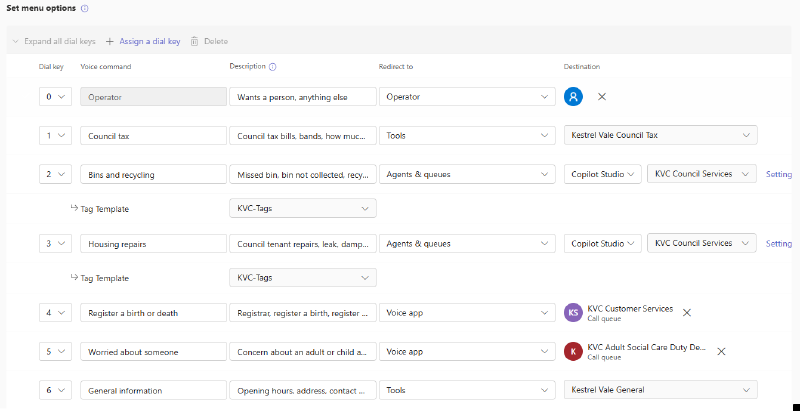
A few things about that table.
Keys 2 and 3 share an agent. Both point at the same Copilot Studio agent, and the tag template has to be linked on each option that uses it. Without it, the agent’s transfers back to people have nowhere to go. The tags are created in PowerShell, and post 8 covers them.
Key 4 started as a stopgap. Registrar calls went to the Customer Services queue while I sorted out Bookings. Since GA it points at a Microsoft Bookings appointment tool, which post 9 covers.
Key 5 goes to a person. It goes straight to the duty desk, not through the Copilot Studio agent. That’s my view and not a Microsoft rule, but I don’t think safeguarding should depend on an AI conversation. A person should pick that call up.
Tools can be picked early. The admin centre let me choose a Q&A tool that was still processing, as post 3 found. Check it’s Ready first.
Step 4, the after-hours call flow#
The greeting is “Thank you for calling Kestrel Vale Council. Our offices are closed. We open at 8:30am on weekdays.” The disclaimer has its own wording out of hours, “I’m the council’s out of hours virtual assistant. Let me know what you would like assistance with and I will see if I can help.” It still ends by inviting the caller to speak, for the same reason as in hours. The 10-minute limit is the same. The menu is a different design, not a copy.
| Key | Voice command | Description | Destination |
|---|---|---|---|
| 1 | Emergency repair | Water leak, flooding, no heating, electrical danger, unsafe home | Agents & queues: KVC Council Services with KVC-Tags |
| 2 | Homeless tonight | Nowhere to sleep tonight, homeless, evicted today | External number, out-of-hours housing |
| 3 | Dangerous building | Dangerous structure, collapsed wall, building unsafe | External number, building control |
| 5 | Worried about someone | Adult or child at risk, abuse, safeguarding | External number, emergency duty team |
| 9 | Everything else | Any other enquiry, leave a message | Shared voicemail, transcription on |
In the lab the external numbers go to a test mobile. External transfers need the resource account to have a voice routing policy for Direct Routing and the right outbound licensing, and Microsoft’s licensing prerequisites page is the place to check that, not this post.
The AI is still in the call out of hours. Routing and spam detection both work once the caller makes a request, so don’t build the after-hours flow as if it’s a dumb menu.
The remaining steps#
Authorised users. Not supported for a Teams Phone Agent. Microsoft’s known issues list it as “Authorized Users: Not supported”.
Templates. At GA you can pick an automatic recording template here. The GA known issue says assigning it while creating the Teams Phone Agent fails, so save first and then edit. Spam detection is still PowerShell only. In preview, saving in the admin centre cleared the templates I’d set in PowerShell. I re-tested at GA and a save kept both, so that looks fixed. Post 5 covers both.
On a customer project#
- Write the menu descriptions in your callers’ words and treat them like prompts. Test with how real people phrase things, because they won’t use your service names.
- End the disclaimer with the question, in every call flow.
- Send anything sensitive, safeguarding in my case, straight to people.
- Set the maximum call length from your longest real journey, including the transfer.
- Design after-hours as its own flow. Ask what a caller at 11pm can actually be helped with and by whom.
Next up is post 5, spam, recording and call length templates.