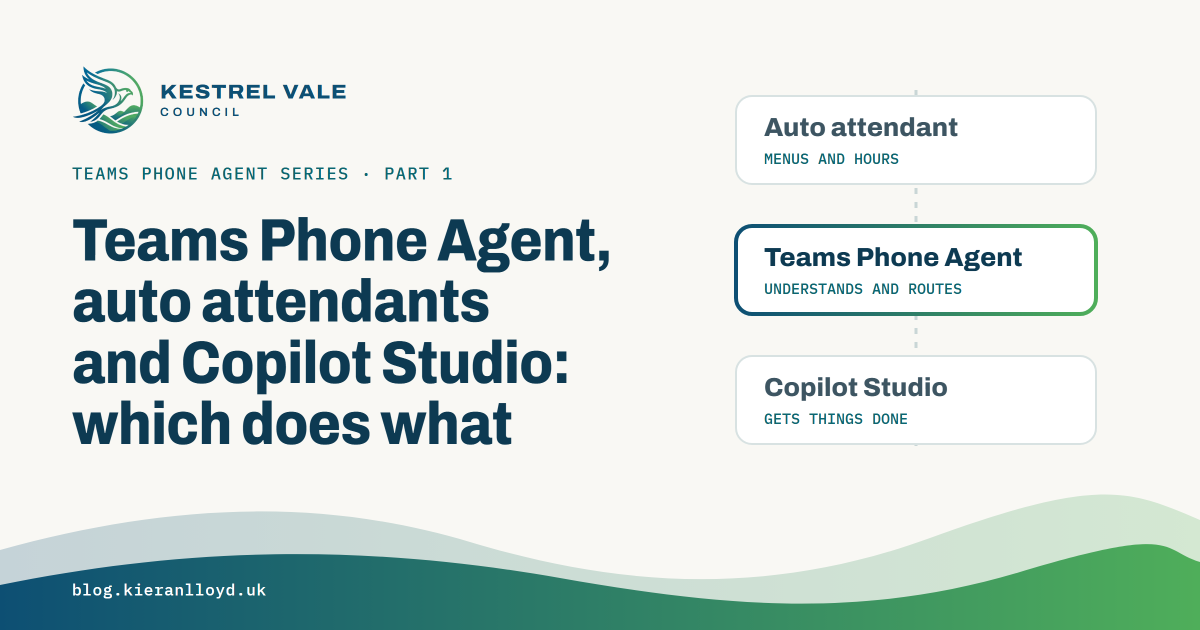

The first thing I had to get straight before building anything was where Teams Phone Agent stops and Copilot Studio starts. They overlap, the naming doesn’t help, and if you get the split wrong you end up trying to make one of them do a job it isn’t built for.
This is how I think about it now, after a couple of weeks of building and a lot of test calls.
It’s an auto attendant underneath#
Teams Phone Agent isn’t a separate product sitting next to auto attendants. It is an auto attendant with an AI front end switched on. You create it in the Teams admin centre under Voice > Auto attendants. Since GA, the Add button has a Teams Phone Agent option. In preview you added an auto attendant and switched the Teams Phone Agent toggle on. In PowerShell it’s still Get-CsAutoAttendant, and a lot of the cmdlets still carry the old preview name, Mainline Attendant.
That’s good news if you’ve built auto attendants before, because most of what you know carries over. Resource accounts, business hours, holidays, the operator and dial by name all work the same way.
What the AI adds#
A standard auto attendant gives callers a menu and waits for a key press or a keyword. Teams Phone Agent greets the caller, plays an AI disclosure, asks how it can help and works out where the call should go from what they say.
Each menu option still has a key and a voice command, but it also gets a description and a destination. The description is what the AI reads when it decides where to send the call. I’ve found it helps to write those like you’re briefing a new starter on the switchboard: what this option is for, and the words a caller might actually use.
The destinations go well beyond what an auto attendant can do:
- Tools. Q&A tools answer questions from documents you upload. Appointment tools book, change and cancel appointments, either through Microsoft Bookings or your own booking API.
- Agents & queues. Copilot Studio agents and third-party IVRs.
- The usual auto attendant targets. The operator, people, voice apps, resource accounts, shared voicemail and external numbers.
On top of that there are templates for spam detection and automatic call recording, and a maximum call length, which defaults to four minutes.
The Q&A tools are the easiest win. The fiddly part is getting your content into them, which post 3 covers.
Where Copilot Studio comes in#
Teams Phone Agent is good at understanding a caller, answering questions and routing. It doesn’t do multi-step work against your own data. It can’t look up a resident, ask which bin was missed, create a case and read back a reference number.
That’s what the Copilot Studio voice agent is for. In Kestrel Vale it handles missed bins, housing repairs, emergency repairs and case status checks, using topics, Power Automate flows and Dataverse. Teams Phone Agent hands the call over through an Agents & queues destination, and when the agent needs a person it hands the call back with a tag that routes it to the right Teams call queue.
One thing to know early. When Teams Phone Agent hands a call to Copilot Studio, the caller’s number doesn’t come with it, or at least it didn’t in any of my testing. I’d planned to identify residents by their phone number and ended up asking for their postcode instead. Post 6 covers that properly.
You can also give a Copilot Studio agent its own number through an AI Agent resource account and skip Teams Phone Agent altogether. I haven’t tested that path yet, so I’m not going to say much about it here.
Is there still a place for a standard auto attendant?#
Yes. If the call flow really is “press 1 for sales, 2 for support”, a standard auto attendant does the job and nobody has to explain AI disclosures to the legal team. I’d only reach for Teams Phone Agent when callers are asking questions, describing a problem in their own words, or getting lost in a menu tree that has grown over the years.
Dynamics 365 Contact Center is the other end of the scale, a full contact centre platform, and it’s outside this series for now. I did build the Kestrel Vale data on the standard Contact and Case tables so the same data can move into Dynamics 365 Customer Service later without a rebuild.
How I split Kestrel Vale#
| Job | Where it lives |
|---|---|
| Greeting, AI disclosure, working out what the caller wants | Teams Phone Agent |
| Council tax and general questions | Teams Phone Agent Q&A tools |
| Missed bins, housing repairs, emergency repairs, case status | Copilot Studio voice agent |
| Customer Services, Housing Repairs, Adult Social Care duty desk | Teams call queues |
| Spam screening, call recording, maximum call length | Teams Phone Agent templates and settings |
| Register office appointments | Teams Phone Agent appointment tool with Microsoft Bookings |
Admin centre or PowerShell?#
This is the part that changed most at GA, so treat it as correct as of 30 September 2026.
You can do these in the Teams admin centre:
- create the Teams Phone Agent and its menu options, including Copilot Studio agents
- Q&A tools and custom appointment tools
- the AI disclosure text
- the maximum call length and the message callers hear when it’s reached, which was PowerShell only in preview
- assign an automatic recording template, also PowerShell only in preview
These are still PowerShell only:
- spam detection templates
- creating a Microsoft Bookings appointment tool. Microsoft’s docs say the whole Teams Phone Agent has to be built in PowerShell, but at GA I created the tool in PowerShell and then picked it on a menu option in the admin centre, on a Teams Phone Agent I’d built there. Post 9 covers it.
The catch during preview was how the two interacted. When I edited my Teams Phone Agent in the admin centre and saved, it cleared the spam and recording templates I’d set in PowerShell, with no warning, so I re-ran a short script after every admin centre change. I re-tested it at GA, and an admin centre save kept both templates, so that looks fixed. I’d still check after a save on a customer tenant, and post 5 has the commands.
Microsoft also lists a GA known issue: assigning a recording template while you’re creating a Teams Phone Agent fails. Save it first, then edit it and add the template.
Before you start#
- Availability. I built this during the Frontier public preview. Teams Phone Agent went generally available on 30 September 2026, so you don’t need Frontier any more.
- Licensing. Read Microsoft’s Teams Phone Agent licensing page rather than relying on a blog post, and don’t assume what applied in preview still applies at GA.
- Voices. Even at GA there’s no voice optimised for British English. Ava is the default and is optimised for US English. My first test call came back in an American accent, which for a UK council demo isn’t ideal. Check the voice list before you promise a customer anything.
- PowerShell. The docs say module 7.9.1-preview or later. I’ve been on 8.0.0, where a couple of parameters are mandatory that the docs show as optional.
Next up is foundations: resource accounts, Direct Routing, and a resource account type the docs don’t mention yet.